August -23 releases
2023-08-17
Features
- AppleTV. Avails feed for European Countries with required restriction
- Reports
- Updated subtitle report with audio language to better understand which type to set (caption/subtitle)
- A new Metadata report.
- Asset Status report is update to the same structure as other reports
- Content Sharing is updated. Brand logo. Extend sharing time and Plays
July -23 releases
2023-07-04
Features
- AppleTV export.
- Avails feed for each country
- Option to show/hide avails feed.
- Daily avails feeds backup to build history of feeds.
- Fast SCC validation for subtitle rows with times outside the video duration
- Asset Status report.Original language is included in the report
- Roku Export.
- Removed schema validation for Metadata updates
- Export Image types come now from export settings
Fixes
- Comcast export. Unexpected video updates for Comcast.
June-23 releases
2023-06-26
Features
- AppleTV export.
- Adding Crop info to the VDP xml
- Adding category mapping to genre and set genre in catalog feed
- Adding production companies as Studion in the Catalog feed
- Roku export.
- Remove artwork roles for Film.
- Only export crews which has role accepted by Roku.
Fixes
- Global license. By mistake we allowed a global license to be edited and become a Country license. That action break many rules in the system. Now the Global license checkbox only can be set during creation.
2023-06-22
Fixes
- Roku Export.
- Remove empty xml property <cast \> when there is no actors for the asset.
- Remove genres from episode level, only keep the genres on Series level
- Mezzanine export. The export did fail to run in some edge cases.
2023-06-21
Features
- ShortTitle is now an optional field to use in the info task. ( old Cable labs field that is rarely use to day)
- Roku Export. Delta are now using the schema validation from Roku as a last verification of the XML files delivered.
- AppleTV Export.
- Delta ID (the integer ID) will be used as “contentId” in the feeds to Apple.
- Image and metadata updates will done automatically in the Catalog feed
Fixes
- Roku Export. Fixed issue with missing language and data_file role in the XML files
- Magine export. Removed “Ribbons” from the export view
2023-06-13
Features
AppleTv Export.
Updated catalog feed and availability feed with support for several regions.
The avails view and export view has links to the feeds for verification.
Comcast Export.
For delivered assets there is now a “Full re-delivery” button which will deliver the asset as it was new to comcast. Sometimes Comcast requests a re-delivery, then anyone can do it with a button.
Fixes
Export avails view. The “Clear filters” button was not always activated when filtering was enabled.
Vimeo export. Fix for republish issue.
May-23 releases
2023-05-23
Features
- AppleTV export
- Roku. Remove the Excel sheet delivery feature.
- Black borders. Optional detection of black border in mezzanine file.
- Avails view. Added filter for Asset Status, Export Status and Resolution.
- Avails view. Moved the Manual delivery of Avails to the Avails view from the VodExport view.
Fixes
- Avails manager minimum start dates for licenses.
- Roku export. Init/update xml package now update to latest specification.
- Amazon Global manifest generation for Season Trailer “VAM”. In special cases the VAM xml was wrongly formatted.
2023-05-10
Feature:
- Pending updates. We have now a nightly job that will initiate updates of exports for changes in the CMS that users have not pushed. If you change an asset which is in ready status and is exported then we do not update the exports directly. The reason is that Delta waits for all changes to be done before updating each platform, therefore you see a button “Update exports” in tasks and a small icon in Rights. By clicking the buttons you can deliver all your changes in one go to the platforms. However we see it is easy to forget to finish the updates by using the “Update exports” buttons so we have now that will make sure all pending updates go out during the night.
- User access. Improved the administrations of users access with multi select for Brand and Export.
Fixes
- CheckIn of Subtitle for Trailer was time validated as Feature subtitle.
2023-05-04
Feature:
- CheckIn. Check in of mezzanine files can be done from a S3 bucket.
- Roku export. The Roku export now supports updates by sending the XML files automatically via Aspera. No need to email excel sheets with updates.
- Amazon export. If there is several languages versions of the metadata in the CMS, the Amazon export can now filter out a selection of the languages
Fixes:
- The proxy player did show the trailer subtitle as an option for the feature
April-23 releases
2023-04-18
Feature:
- Captions in Amazon. In the Delta CMS you are able to upload both Subtitles and Captions. Now we also can deliver both formats to Amazon in the export. So you can have an English subtitle and an English Caption file.
- Trailer subtitle. Amazon export now support subtitles for trailers.
- Use an existing ID for Amazon. When content is imported to Delta from another system that already exported assets to Amazon we can now take over the deliveries and updates using the same ID in Delta.
- Second location Mezzanine. Delta has a new way of securing the Mezzanine files. Each file in the Delta storage server can be copied out to a second location as a backup in AWS DeepArchive. The copy are done in background for each new file that are ingested.
- DeltaVod API Swagger. The swagger documentation are update with Auth information.
Fixes:
- Cast&Crew validation. Then last version deployed had mixed up the Movie and Series validation.
- Vimeo export. In rare cases we get error from the Vimeo API, we now correct handling the export and set to Delivery error
2023-04-12
Feature:
- Character. In the Amazon export we have now added the Character name that the an Actor play ( the role name)
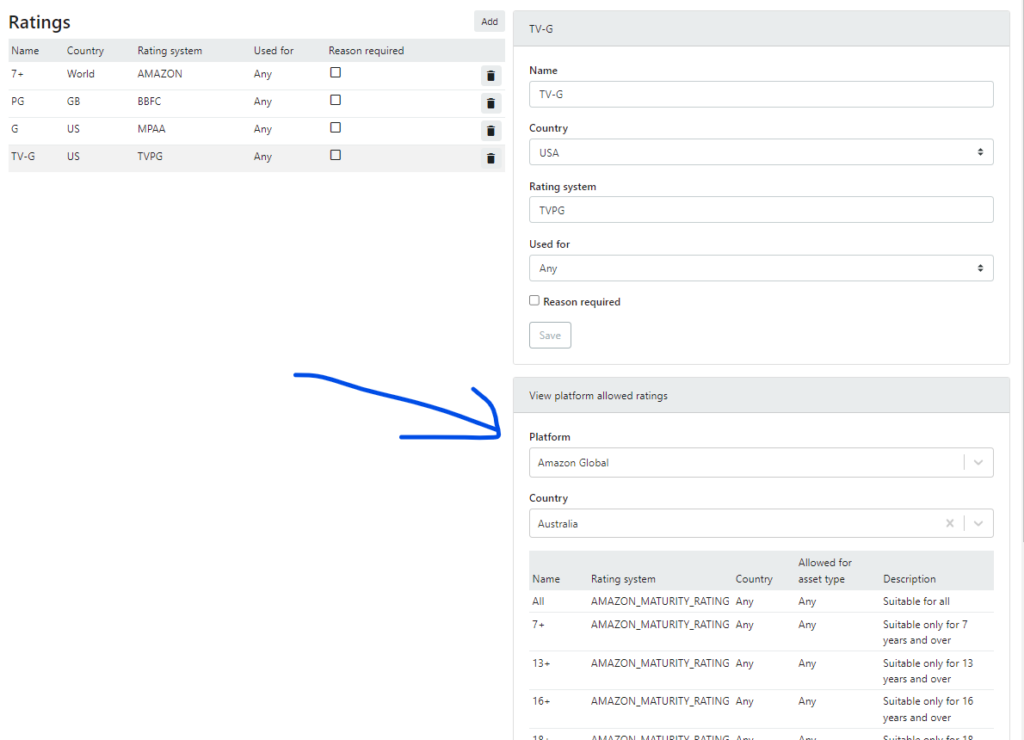
- Rating reason. If a rating value also has a “reason” it will then be included in export to Amazon. Some rating systems require a “reason”.
- Rating settings. When managing the ratings to use you now have lists of what allowed values each platform has.
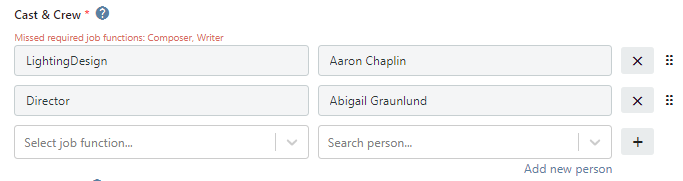
- Cast & Crew validation. We now show missing cast & and crew based on the validation rules in the info page.
- Amazon GroupIdentity. Delta export to Amazon now supports delivery to several regions by using separate GroupIdentity for each region.
2023-04-03
Feature:
- Content detail view. The view has be updated with latest metadata fields
- Cast&Crew
- Job function
- Character
- Production Companies
- First release date
- Cast&Crew
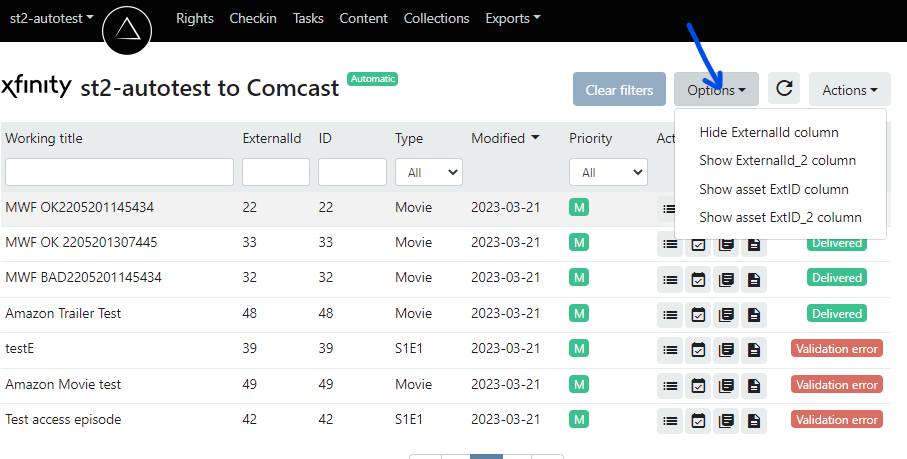
- Export view. The list view has now options to show/hide id columns. As a user you can show what’s of interest. We like to improve the id names but here is what they represent. The usage of the IDs are very different from export to export and also from where content was imported ( if not created in Delta)
- ExtId – External id for imported assets into Delta. Id from the source system.
- ExtId_2 – A second external id for imported assets into Delta. ( some source system has 2 ids)
- ExternalId – The ID shared with the platform Delta exports to.
- ExternalId_2 – A second ID shared with the platform Delta exports to.
March-23 releases
2023-03-28
Feature:
- In Delta2Vod export. In integration with JW Player we now check the “media” status for ready transcoding before setting the export to “Delivered”.
- The new Amazon Avails view. Navigation icons to and from the export view.
- No Content Provider are now pre selected when creating an asset.
- In JW player export stop upload of video file larger than 25GB which maximum at JW player.
Fixes:
- When going to page 2 in the log view and then go to another asset then you now correctly see page 1 of the logs, before you saw the page 2 even if it not existed..
- Delta2Vod export. Issue with image validation are fixed
- When setting up a new export we now set the time zone to UTC as a default value.
- When new validation rules are created for a new brand, we now set Custom Slug to be unique.
2023-03-21
Feature:
- Send notification of exported assets as a webhook.
- Delta2Vod Export to S3. Video with MUXed subtitle, images and sidecar subtitles.
Fixes:
- Hiding the Season licenses. In Delta the Licenses on the Season level are not used in any export. When Delta starts to use the Season licenses we show them again.
- JobFunction which has 2 words was written as one word without space in the Delta2Vod API
- Changed validation of rating for Amazon global. Rating system TVPG can be used for both movies and series in the US. ( MPAA can only be used for movies)
- When uploading a new subtitle for an asset that has been exported, the system did not show the option to “Update export”.
- The titles in the Rights grid are now links. ( you can now right click to open in new tab)
- Timeout when downloading Avails documents locally when there is a large amount of assets.
- JW player. Video and subtitles can now be exported and updated for the JW player platform.
Fixes:
- Only visible language versions in the Info Task will now be validated. Languages versions of title and summary which are removed from the brand setting will still be kept for the future and not used when validation the task. All language versions can be seen in the Content view.
- ExtId and ExtId2. In the task view there is 2 optional columns in the left side list. Use the “Options” to show or hide the 2 columns
ExtId and ExtId_2 can hold ID’s if the content is imported from another system ID. Corresponding ID columns are there for the Export views.
- Delta2Vod API. Content provider is now added to the CMSdate section.
- Production companies can now be exported to Amazon as DisplayCredit.
- “Reason” is now a new field for “Rating”. In reason you now can explain in free text why a specific rating value is set. Some platforms require a reason in some countries.
February -23 releases
January -23 releases
December -22 releases
November -22 releases
2022-11-29
Feature:
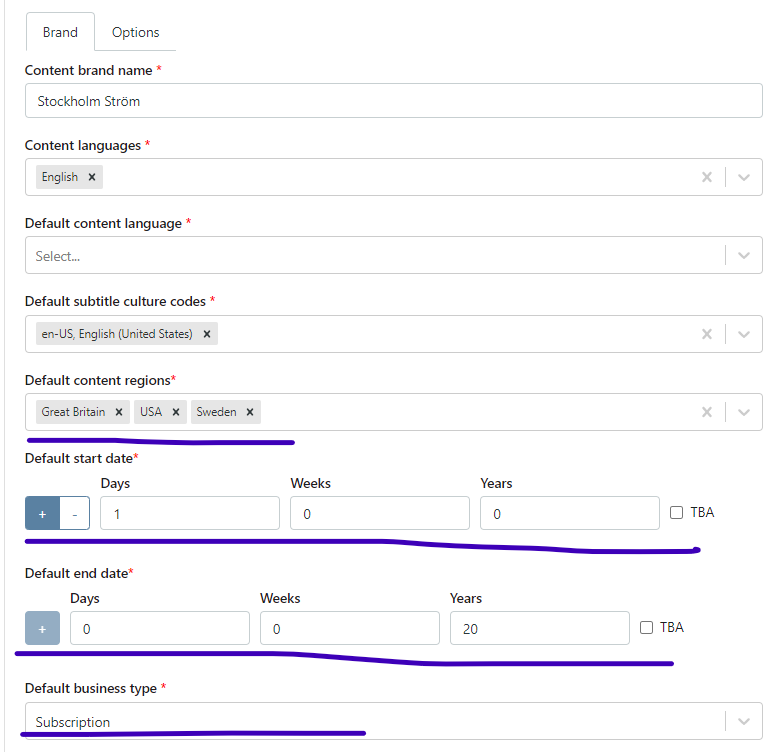
- When creating a movie or series, we now have a description for the ExtId and ExtId_2 fields which can describe the usage for each customer.
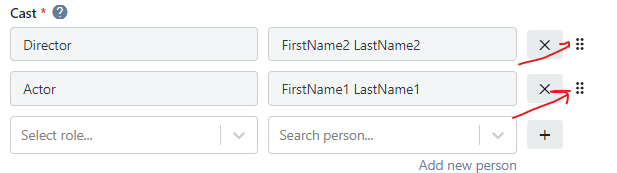
- When manage the cast for an asset in Info task we made it more clear that the order of the cast can be changed. Some exports support an ordered cast list, not all.
Fix:
- Correction of issues with the subtitle update in Magine
2022-11-22
Feature:
- Magine Export, Subtitle update. Delta now checks if the asset was delivered in the old ingest model at Magine. If the older version was used Delta redeliver the video during a subtitle update. Otherwise Delta just posts a the updated subtitle in the new Magine API endpoint for subtitles.
- ID in Details. In the Rights details Delta now displays the ID for the asset.
- Create Studio. When creating a new movie or an series/season/episode and you not find the studio need, you can now create the studio with in the creation view.
Fix:
- Magine Export, Images. Correction of the API call to update assets. In the previous version the existing images in the Magine platform could been be removed during update.
- Short Publish Date. When setting the Short publish date for the Amazon export and the asset has been delivered, Delta reset the short publish date flag. Unfortunately, Delta did that a bit too early, now the reset of the flag is done once the Delivery to Amazon has reached Delivered status AND the start date is passed.
- Delete Ratings. In the list of Ratings used for the brand you can delete unused ratings. If the rating was used by an asset marked as deleted in Delta, then it was not possible to delete. Now Delta accepts to delete Ratings that are used by deleted assets. If you try to delete a rating which is currently in use, then get an error message with the ID of the asset using the rating.
- License changes in log. In the Asset log Delta did not show if the start- or end-date was set to TBA instead a date time was logged which was misleading.
- Database time out. We fixed an issue where there can be a time out in the DB query when displaying the Content page.
2022-11-15
Feature:
- Help text. There are now more ?-icons with help text in Rights and in Task Info tab
- Magine Export. We have added support for a new image type “Sixteen-nine-title”
- Clear filter. When you filter/search for asset a “Clear filter” button will be highlighted. It also an indication saying the you not see all assets.



- Remove Trailer. In the Task Media tab it is now possible to remove a faulty ingested trailer video.
- CheckIn trailer. Only feature video can be checked in for episodes, trailers are blocked. (exports only can have a trailer for a Movie asset, not a episode asset)
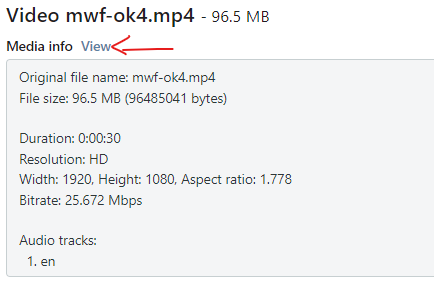
- CheckIn validation. If the video file is “Truncated” the show an error message and refuse to check it in. We trigger on the flag in MediaInfo saying “IsTruncated”: “Yes”. In the Checkin view there is a link to the full MediaInfo analysis.
Fix:
- Invite user. When inviting new user there was a confusing check box for inviting external users, which now are removed.
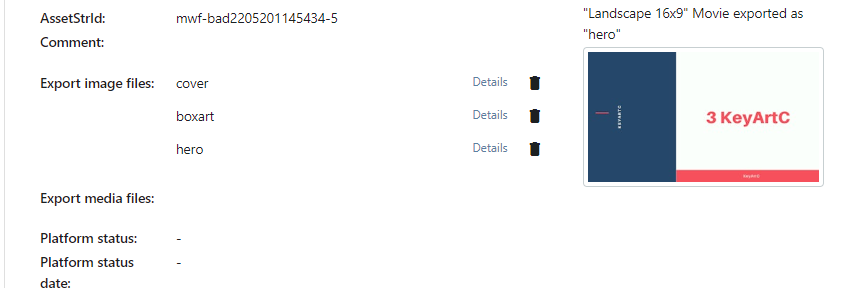
- Export view. Only the image export type is displayed. Each image has a link to details and a remove button.
2022-11-08
Feature:
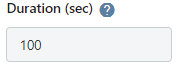
- Info Task. The duration for the asset is always generated from the analysis of the feature video file. Therefore we made the duration non editable in the info task and removed the validation. It can be 0 while marking the Info Task as done. It will later be updated when the video is fully checked in.
Fix:
- Info task. the language version of title and summary did not always load on the page unless you reload the page. This is now resolved.
2022-11-01
Features:
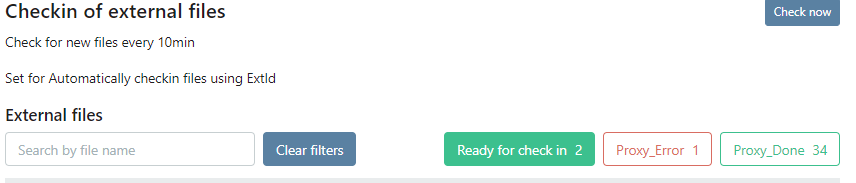
- CheckIn views.
- When you go to the checkin views we will directly trigger a check for new files.
- Status filters are now implemented in both views.
- “Ready for check in”. We have removed the Check Box to only show videos that are ready for check in. Instead you can use the status filters.

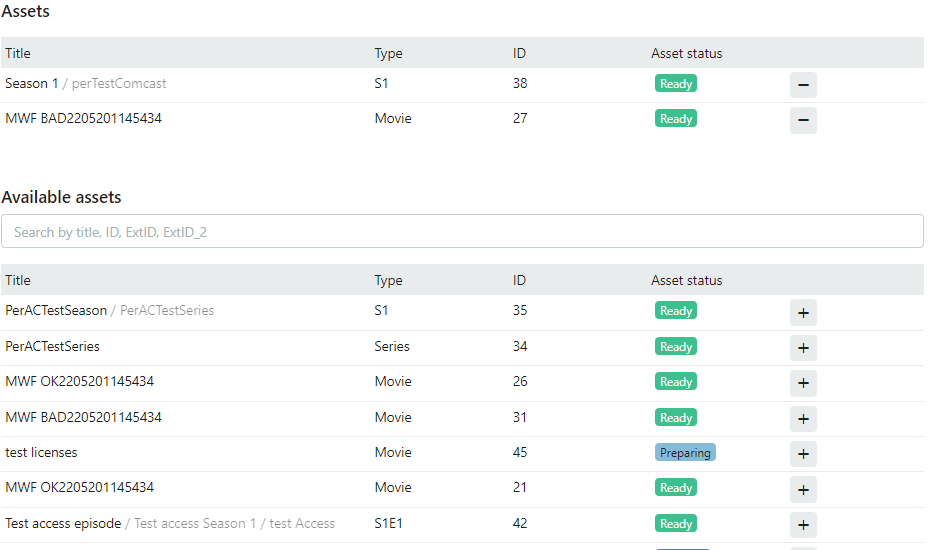
- Collections. Now the ID is displayed and if it is an episode we show the serie, season titles with the episode title
- Play duration is now always set by the mezzanine file and the field in Info task is not editable
- Error message in the upper right corner will be displayed until you close it. Give more time to read and the possibility to include the text in a support ticket.
Fixes:
- Sometimes the Delta system has a faulty message, a green bar with a message that there is a new deployment.
October -22 releases
2022-10-18
Feature:
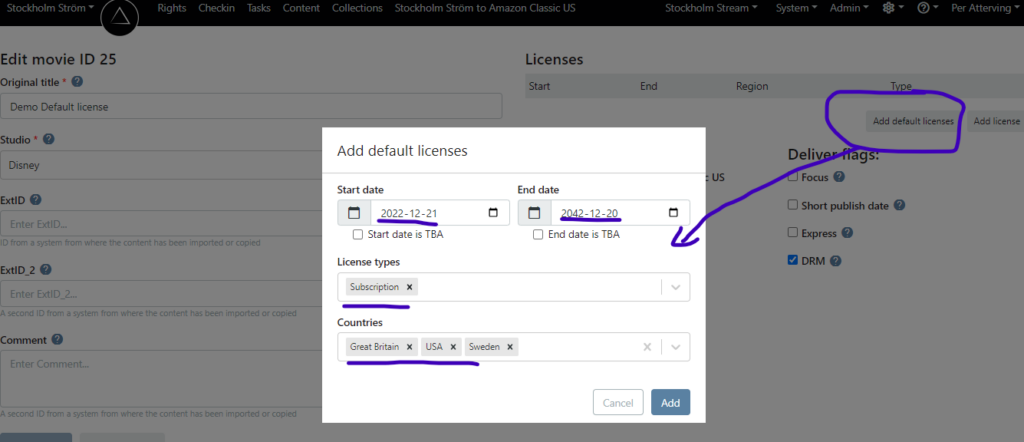
- The license validation and error messages are improved. The extension of an active license window is now possible. If you have to confirm changes of licenses that might un-publish the asset in an export.
Fixes:
- When setting one export’s mode and go to another export view, the export mode you see was cached from the first export. Now it’s fixed.
- When you go to the Rights detail view and try to go back to the Rights grid you had to click the back button twice. Now it’s fixed.
2022-10-13
Feature:
- Navigation. The top menu has been updated and the grid in Rights view have been changed
- The title in rights grid links to the rights details.(instead of the content details)
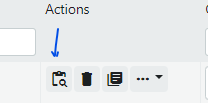
- A new icon for a link to the Content details
- Magine Export. The export are now making use of the subtitle API for exporting and updating subtitles in the Magine Platform. No re-transcoding is needed the update the subtitle when the API call now is in place.
- Media task Checkin video. If you mark the media task as Done while the video file still is in progress for checkin, it will not go back to “To Review” when the file is fully checked in and the proxy files is created.
2022-10-04
Feature:
- Media Task. The player in media detail page can now play subtitles.
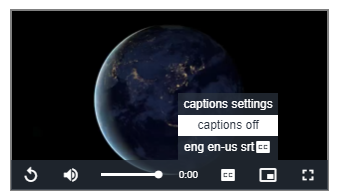
On the detail page you also find a list of the subtitles for the asset. The player will only play the first track.
Fixes:
- Fix for an issue where administrators not could delete a user.
September -22 releases
2022-09-26
Feature:
- We now support the ITT subtitle format in Delta core and in the Amazon export.
- When inviting new users, there is new feature to re-invite. Sometimes the email get lost or the security token expire.
Fixes:
2022-09-21
Feature:
- CheckIn. Filter for ProRes video files. Sometimes they can not be used as mezzanine files, but been added by mistake. Now there is a setting for each brand to allow ProRes or not.
Fixes:
- Task view. Info tab. The slow loading when several languages are present is now improved.
- Task view. Media tab. The Mezzanine file is now a more clear link to the detail page with the Proxy player.
- User Administration. Access setting fixed for Comcast export users.
- CheckIn view. Re-try button of failed assets are now added.
2022-09-20
Fixes:
- In Rights view: Take a Series in to “Preparing” was not fully working when first taking Series and then Season and then Episode levels.
- Comcast export. The end date has always be 2 days ahead. Fixed cases where we sent passed end dates.
2022-09-05
Features:
- Amazon Global export with trailer for season.
- The season asset can not have a Trailer in Amazon, but a episode 0 can be delivered as a trailer with extra “promotion-flags”
- In Delta Core you can now create a episode 0 for a season and add metadata, images and video like any other episode and it will be delivered to Amazon Global as a promotion trailer with episode #0. ( Add the trailer video as a Feature(not Trailer) to the episode in this case)
- Multi language in Amazon Global export
- Localized information like title, synopsis can now be exported from Delta Core for each export language.
- Localized images can be delivered for each language. Amazon require image files for each language even if the image not has text and not really bound to language.
- Ratings has been improved
- You can now set, besides the rating code, the rating system and region the rating belong to and if the rating can be use for any asset or just Movie or Series
- In the Info task you can now set multiple ratings for an asset.
- Current exports look ONE for a rating code for the country the export is configured for.
- Amazon Global export can now deliver multiple ratings where code, region and rating system are within the metadata.
- CheckIn. There is a new CheckIn page for mezzanine files
- In the view you see all files, without first selecting an asset. If you find a file to CheckIn, you are able to lookup an assets to attach the file to, “Checkin”
- You find the page in the top menu between Rights and Tasks
- In the new CheckIn page you can filter on status.
- You will be able to re-try failed asset.
- You might have many files in “Process_Done” status that you don’t like to check in for some reason, then it is good to delete them. See the Trash bin icon.
- Export file names as change
- Amazon Global files will have Brand in the start of the file name they not get mixed between brands on the Amazon side.
August -22 releases
2022-08-16
Fixes:
- Fix for CheckIn error, when checking in mezzanine file with variable bitrate in the audio track.
2022-08-09
Features:
- Multi language metadata for assets
- In Brand settings you can now set default language and add languages to include in the Info Task.
- In the Info task you manage localized language data as titles, summaries and customSlug
- In coming releases the multi language will be implemented in the exports. first will be Amazon Global
Fixes:
- Magine Export. Mapping rating codes to ages when rating code not contain a number.
- Fix for “Creating a new series gives an error the first time, and works the next time.”
July -22 releases
2022-07-26
Fixes:
- Magine Export. Set the correct language code on the properties in posted json.
- Content page. Fix link to Proxy for mezzanine file so it can be played
2022-07-21
Features:
- Comcast export. Configurable list of accepted rating codes are now used to validate the ratings delivered to Comcast. If non-accepted rating are used the the asset will fail in the export.
- Valid rating for movies G, PG, PG-13, R, NC-17.
- Valid rating for Series TV-Y, TV-Y7, TV-G, TV-PG, TV-14, TV-MA
- Comcast export. Rating used in Delta Core can be mapped to other values before they are exported to Comcast.
- Comcast export. The export is update according to request from Comcast to never have an end date set earlier than 2 days (48h) the the current date / time. ( Comcast can not unpublish directly and only read the RRS feed in Delta once a day)
June -22 releases
2022-06-09
Features:
- Amazon classic Avails. Adding “SDP” to the LicenseRightsDescription column if the asset has “Short Publish Date” set in Delta.
- If an asset not has “Short Publish Date” set when the export started (Asset has Preparing status in Delta) you cloud not force out a change to have a faster publishing date then 30 days. Now you can. In asset status in Delta you can modify the “Short Publish Date” for as early publish date as possible in the Avails.
- New option. Collections can now be used to deliver key words for the Amazon Classic carousels.
- New option. Subscription package can be managed for the initial delivery to Magine
Fix:
- It was not possible to change the order of seasons in Rights. Now it works.
May -22 releases
2022-05-24
Features:
- When adding or removing content in the Collections, automatically push changes to the platforms. The push will be done when the new collection version are published.
- Thumbnail images from the mezzanine file are now displayed in the file detail page in tasks.
- Batch job feature for SysAdmin and file processing. Two batch jobs are created so far:
- Add MediaInfo and Thumbnails for all Mezzaninen files that has it set.
- Create proxy files where they are missing.
Fix:
- Correction for Rev order flow that give a wrongly error message.
2022-05-10
Fix:
- The validation of the subtitle timing compared with the video file duration did not log the warning to Asset log.
2022-05-03
Fixes:
- After sync using Asset.StatusChangeDate and snapshot is equal set new VodExport.StatusChangeDate so next sync not need to validate the snapshot once more in coming syncs.
- Issue with rating NR. Amazon Global do not accept NR as rating for MPAA and TVPG system. NR is now removed from the accepted rating codes in Delta
April -22 releases
2022-04-26
Features:
- Add NetX image feature to Amazon Global export.
- Ingest of subtitles where file name has ID in the file name.
- Improved Mezzanine video export so it can be done several times, to different persons.
- Add “custom slug” to the info task. Will be under the localized title, if enabled. The custom slug could then be used in exports to platforms for having better URL to the asset for the end users. Brand settings: Customer Admin is able to enable/disable the editing of the custom slug. Delta will validate the slug so the format works well as a part of a URL and that is unique from the brand.
- Magine export. Optionally the “Custom Slug” can be exported as Magine’s “customId”.
- REV subtitle order now can be used for trailer subtitles as well.
- Update Exports when licences are reaching start or end dates in one of many regions. Some platforms only has one start and end date for the asset even if is published for several regions, so delta figure out the first license start date and last end date for all regions when exporting. What we added now is feature that daily check if one of the regions not has a valide license window any longer so delta can update the platform with a changed set of regions for the asset.
Fixes:
- Remove the button to export source media file in the content page.( the source file was used to checkin a mezzanine video. The source file not stored in Delta and can not therefore be exported)
- Unpublished series changing from Unpublished to New in Amazon Classic even if there was no season or episode to re-publish. The is now fixed.
2022-04-12
Features
- Set unpublished in export with help of end date and time zone for export. Each export has now a timezone setting so we can set the asset to Un-Published status at the right time depending on where the content is published. Before we used UTC time.
Fixes
- When updated sixteen-nine image in Magine, the poster image was removed from Magine.
- Wrong Image are shown in Magine export.
2022-04-06
Features
- Rev. subtitles. We now have full integration with Rev. As an option you can order captions from Rev direct from the subtitle task. It require that there is a proxy for video in Delta. https://www.rev.com/
- Tasks can now have a deadline. The task list can be sorted by deadline. The deadline is set when you take the asset to “Preparing”. The tasks list give a warning if you are close to deadline and an alert if the task has passed the deadline.
- CheckIn of video. Improved speed. If video is found in CheckIn, then start the process to analyze and creating thumbnail images direct without waiting for scheduled task.
- If Magine API is not responding during export we will now get clear log message in the export view.
- We have scaled down the images in the Export view for a faster load time.
- Brand setting, the “Default subtitle culture codes” is improved to multi-select culture-codes
Fixes
- If information at all are saved for an asset then it did pass the validation and task could set to Done.
- The export graph in the home page did show for Amazon export, assets that just added to the Avails doc as exported. Now we show fully exported asset in the graph.
Mars -22 releases
2022-03-29
Features
- Updated the Tasks status change action so only one click is needed to set to Done.
- For mezzanine proxy set different audio bit rate depending on audio channels stereo and 5.1
- ComCast export. Comcast Merlin-Tags will be populated in the feed based on Category mapping in Delta.
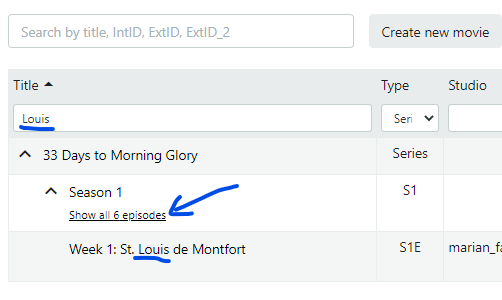
- Search for title in rights. When hit a series or a season you might not see all the children for the asset. In this release you will get information about how many children there is and an option to show all.
Fixes
- Subtitle time diff warning
- Show Viewable link do not work in Magine – fixed
- Validation of Info Task in ValidationService: Added validation of the existence of localized language data.
2022-03-17
- Only known subtitle file formats can be uploaded [srt, vtt, dfxp,scc ]
- Comcast export, we have remove “Re-publish” button since it has no use.
- Comcast export. Changed limitedView values from “True/False” to TRUE/FALSE” as requested by Comcast.
- Rights. When adding country licenses it was possible to set the country to “World”. we have removed World as an optional country. Global license should be used instead.
2022-03-03
Delta Core features:
- Audio track language can be set after verification. In the mezzanine details you can select “Verified Language” and the MediaInfo will be update during export ( if the file is transcoded during export)
- When audio tracks not set in MediaInfo will be set to “und” – undefined in Delta.
- Limit the file extension to CheckIn as mezzanine files. Default we take in .mp4 and .mov
- There is a new report for total play durations of all active content. You find the report in the Delta home page in the lower right corner.
- Subtitles. There are now 2 types Captions and subtitles in the upload selection.
- CheckIn has got Improved logging.
- Exports has got improved logging
- Rights has got improved logging
BugFix:
- We have tried to fix the issue for some Mac-Chrome users that can not upload images.
Exports:
- For Amazon Global we can now have different rating systems for movies and series.
BugFix:
- When adding a new Export we create the Category mapping
- Amazon exports did not fully unpublish the series level when all episodes were unpublished.
Maestro ( orchestrator )
- Graceful stop feature
- Showing Engine ID’s for jobs in task list
- New deploy pipeline
September -21 releases
2121-09-22
Feature:
- New version of Magine export using the Partner API at Magine.
- Video/subtitle files are uploaded to Magine and a transcode request are done via API
- Images are uploaded and ingest call are done to Partner API
- Metadata are posted to the Partner API.
- Video/subtitle, Metadata and images can be updated.
- The client API at Magine is not used at all.
- Exported assets will get the PlatformStatus Delivered direct. ( no waiting for the publish date)
- In the Delta Export view metadata tab has all request that sent to the API. Transcoding Metadata and the images types.
2021-09-16
Bugfix:
- Check disallowed exports when updating and unpublish if disallowed
Feature:
- Optional EPG endpoint in API
- Improved Ingest service
- CheckIn. Filtering for both ExtId and ExtId_2 of new files
- Boarder type can be changed for already ingested mezzanine
July -21 releases
Cast Order
In the info task it is now possible to order the cast by “drag and drop”. Only saved cast can be moved to a position. there is a “handle” in the space between first and last name.
Custom Data fields
2021-07-14 New feature for adding custom data. Under the menu “customer” the user with “Customer Admin” access rights can add extra custom data fields for the assets metadata. At this point we have 2 types, text string and URL.
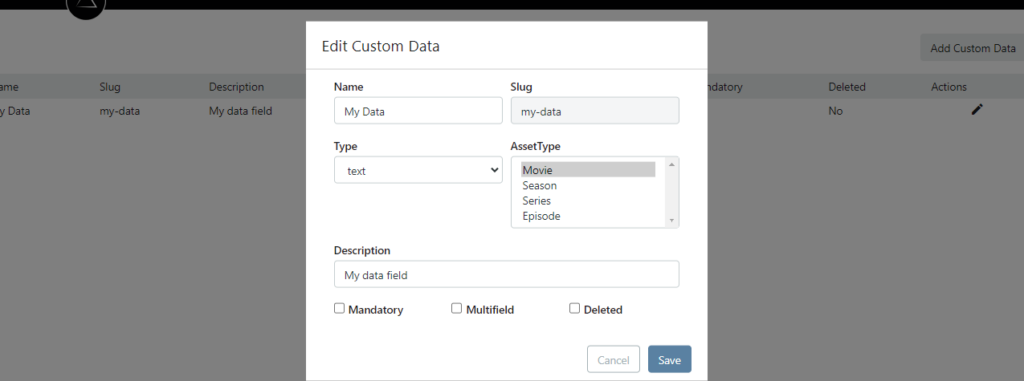
You can set a name for the field and for which asset type it will be used. You specify if it is a mandatory for the asset and if there can be several data values for each asset “Multifield”.
With “Deleted” you choose to not use the field any longer the metadata ( but we do not delete, we just hide it. just in case…)
The custom data are in the Info tab in tasks under the Cast
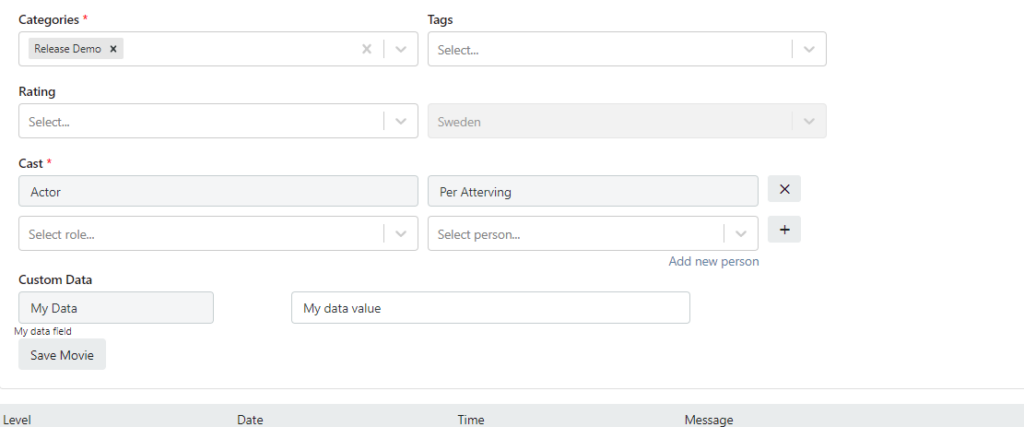
Other kinds of data fields will be implemented later. The CustomData are also available in the API
June -21 releases
Short publish date
2021-06-29. New feature to mark a title with “Short Publish Date” to be used for the Amazon Classic export. For titles with this marking will be published at Amazon without the 30 days ahead notis the Amazon normally request. If start date is passed then the start date in the Amazon Classic export will be “tomorrow”. If the start is in future then the start date will as is in the Rights view. ( without extending the start date to 30 days ahead)
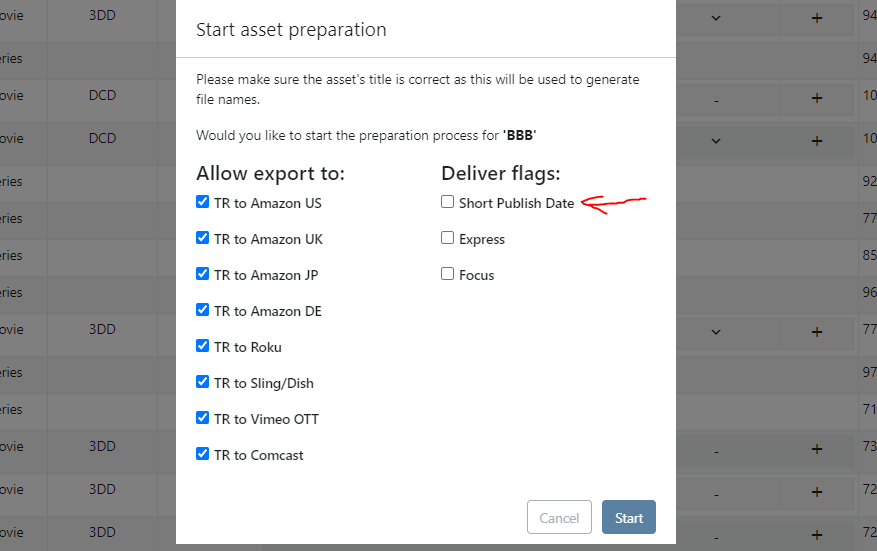
Note. At the same time we added Focus and Express as two new flags for the asset in Rights UI. The logic for those will be implemented in coming release.
Magine Export
Delta export to Magine can now update asset by checking the Magine API for the latest changes in Magine. In this way we do not overwrite changes made in Magine.
The Subtitles can now be exported and updated.
Trailers can also be exported
Comcast Export
We have agreed with Comcast to pull the RSS feed from Delta so new and updated assets are processed once a day in the end of the office hours. The export lock the export for new updates by showing the “Platform status” InProgress for 48 hours and then unlock by setting “Platform status” to Delivered.
Amazon Export
When asset are unpublished, then we follow a new routine to set the end dates. Setting the End date to “To Morrow”.
When license window is closed and the asset is in the export but not fully delivered Status (Coming or New) we will set the end date in the Avails document to “To Morrow” and also move the start date to “To Day” so it will be removed by Amazon.
New feature to send images by email with right size and with names following the Amazon naming standard to be ingest in Amazon NetX portal.
Remove Asset
You could only remove assets that was in Planing status. Now the asset can removed from Delta in the rights view if it not published in an export.
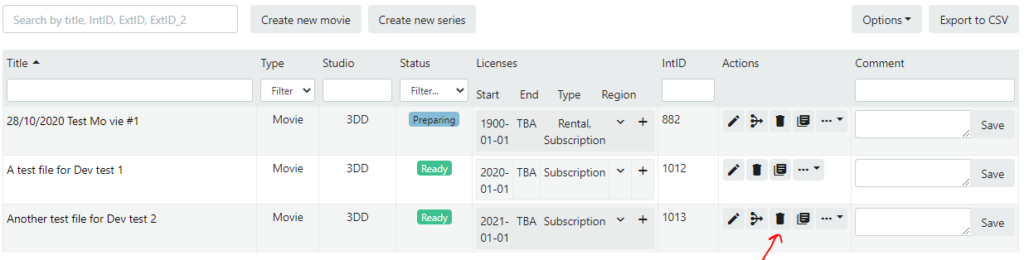
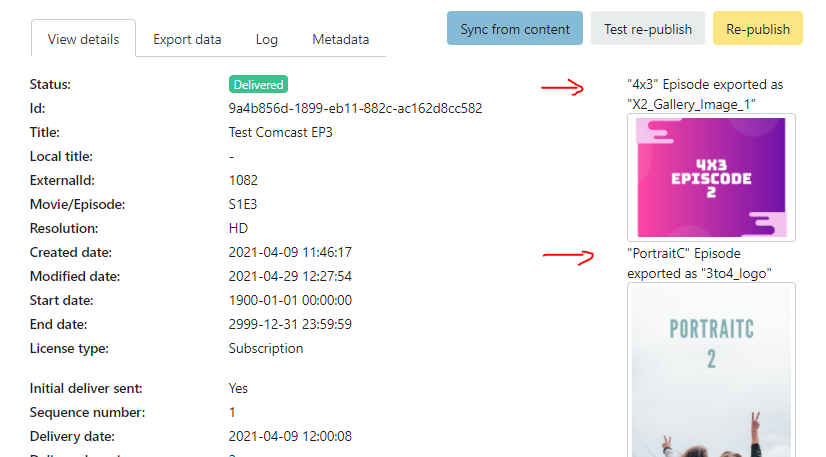
Image Types in Export
All the different image types has be confusing in the exports. In the Export view there is the name of the Image Type in Delta and the image type that the platform use so you now can see both.
Country names to local names
A translation for production countries set in Delta to have the country in local language. Now used in the Magine export.
May -21 releases
FVOD in Amazon
We have added support for Free VOD in the Amazon export. When the FVOD license are ending, the export will do an extra check if there is active SVOD license window for the asset before un-publishing.
Culture codes for subtitles
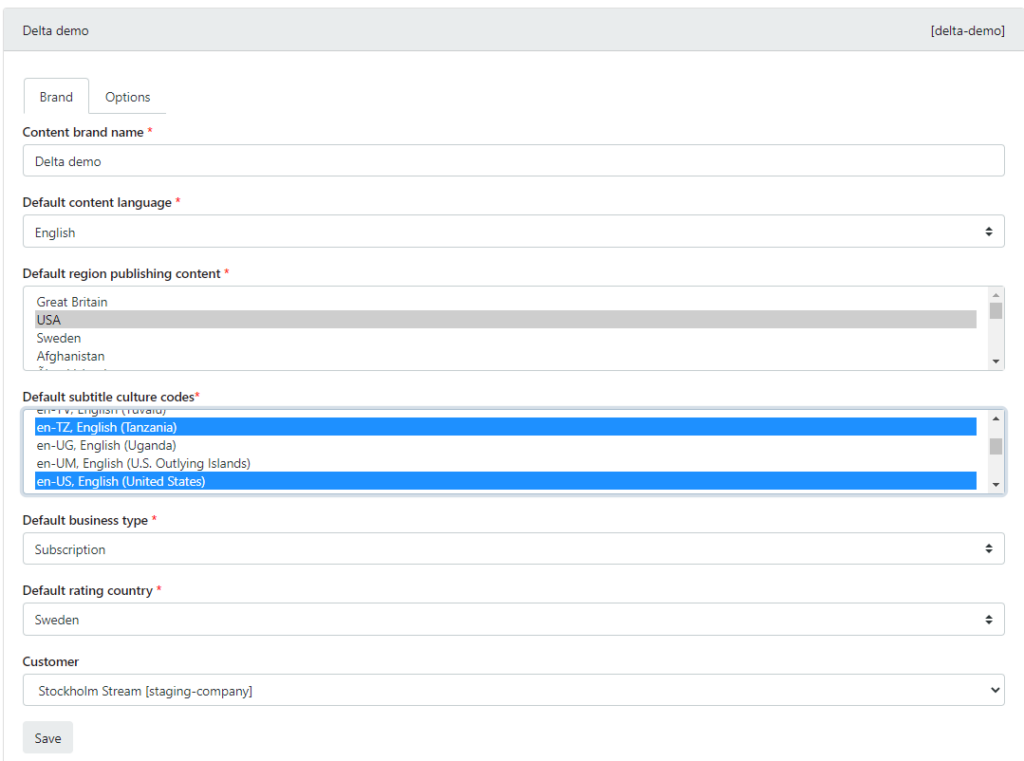
In subtitle task you can now set the culture code while uploading so the language version will be more correct and precise. With culture code you can tell if it is American English (en-US) or Great Britain English (en-GB). Both versions will have the language set the English. In the Brand setting you can now select the “Default Subtitle Culture codes”. You can select multiple codes to use in the task / subtitle view
April -21 releases
Comcast export
A number of changes has been done in the Comcast export
- Support for new requirements from Comcast
- New images
- Support “platform” licenses in RSS feed
- One RSS feed for each for each season
- Upload all images to Comcast even if one is changed
- End date is now set to “tomorrow” in un-publish action
- “Re-try upload” after failed upload is improved
- All versions of the XML feed are stored under “Metadata” tab in the export view
Orange export
New requirement from Orange regarding images and metadata format
- Support new images formats
- New structure of Orange XML
- Export of updates where metadata and images can be updated.
Improvements
- When adding a License the default Type and Country are used as default values from Provider settings.
- In export details. Image details can now be expanded
- In Export details. The resolution are displayed [SD, HD, 4K]
- Downloadable status report. The report now include Studio
- When adding Cast. The + button is adding a new row. ( You do not need to click it to save the cast)
Mar -21 releases
- Downloadable reports
- FVOD
- Comcast export improvements
- Rights improvements
- Magine. New export
Downloadable reports
In the landing page we start to collect reports that can be downloaded from Delta
FVOD
A new license type to make the content Free during a license period.
We can also configure an export to prefer the FVOD license over the paid licenses.
FVOD Sling/Dish
We have removed the Paid/Free toggle button from the Sling/Dish export. You can now see the License type selected for the asset in the export details.
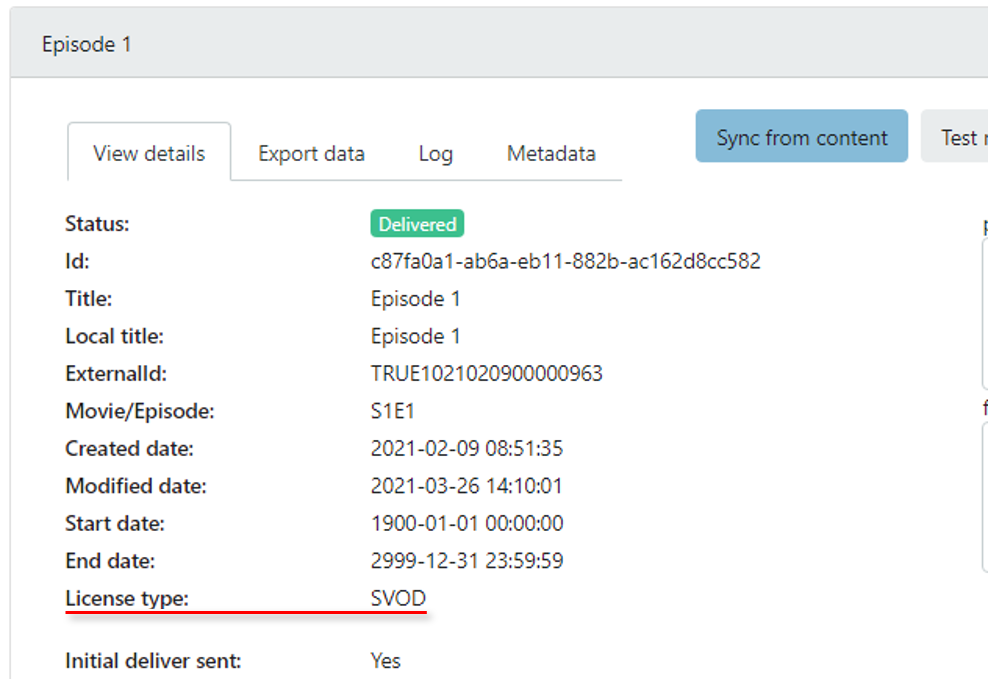
If the License type is Free, then the asset will get the special Ribbon TRUE ROYALTY TV Sneak Peek to indicate it free and no other Ribbon can be set.
FVOD Comcast
We can now set the Comcast export to “Prefer” FVOD over SVOD.
When an asset is exported with Free license it will get a new tag in the RSS feed
<channelstore:metadata name=”limited-view”>True</channelstore:metadata>
Comcast export
Unpublish
If an asset is to be unpublished due to new license with passed end date, or removed license or the export is dis-allowed in Rights. In the case we not will send a License end date set to “tomorrow” on the Comcast request. Comcast can not unpublish asset which has a end date in the past.
Validate start date
If some move the start date from past to future for an asset the been published at Comcast it now will go into validation error since you are not allowed to unpublish asset at Comcast by pushing the start date into the future. ( the asset has to be un-published first)
Rights
Validation for new licenses
A new rule to prevent user to move start date for license from past into future for asset in Ready status. Does not make sens to unpublish exported asset by changing start date to future.
Global License
Magine, Orange and Amanzon Global export can now handle Global license.
Comcast, Amazon classic, Sling, Roku and Vimeo are still to update for Global licenses.
Magine Export
A new export to Magine are implemented which can export Movie, Show and Episod.
In export it can be Video, Subtitles, Images and Metadata.
Updates are still to be implemented
Version 2.8.0 – January 2021
- Check in of Mezzanine files as an optional feature
- As a user in delta you can view a list incoming mezzanine files
- See detailed MediaInfo for the video file
- See thumbnail images from the video
- Selected Mezzanine can be “Checked in” to the archive for the asset
- Improved export synchronization with Delta Core
- Sync only assets which have changed status or…
- when a user force an update in Delta Core to exports
- This will sum up all changes so the export update the asset one time.
Version 2.7.0 – December 2020
- Export to Amazon Global
- Exporting metadata using MovieLabs format
- Automatic Aspera delivery
- Creation of Avails for Amazon
- Series and Season assets get it own tasks in preparing for export
Version 2.6.0 – November 2020
- Made the Delta system multi-tenant
- Home page with performance graph
- Optimized the database performance
- Improved the “self service” features
Version 2.5.0 – July 2020
- Export to Orange in RiGHTv version 9.1 XML format
- Deliver media files and metadata via Aspera to Orange
- Implemented configurable validation rules for Metadata, images and subtitles
- Implemented automatic transcoding to the Orange/RiGHTv adaptive streaming format.
Version 2.4.0 – June 2020
- Ingest of metadata from the Magine system
- Ingest of video from the Magine system
- Ingest of images from the Magine system
- Implemented asset log in task views
Version 2.3.0 – May 2020
- Export to Roku using Roku XML format
- Deliver media files and metadata via Aspera
Version 2.2.0 – April 2020
- Improved image management using Imgix service
- Fully automated transcoding process for exports using Mezzanine source
Version 2.1.0 – Mars 2020
Improved status export flow
- User can set one export to Auto, Manual or Disable
- User can set priority for asset in export
- Track and show changes of metadata for each export
Version 1.6.0 – January 2020
- Manage of “Ribbons” and free content for the Sling Dish export
- Content view with summary of all exports statuses
- Content detail view with details for an asset in all languages and all country versions
Version 1.5.0 – December 2019
- Export to Comhem using Cable Labs
- Media files delivery to Comhem via FTPS
Version 1.4.0 – November 2019
- Ingest module for SF Kids content
- Ingest of Media files using SFTP
Version 1.3.0 – October 2019
- Export to Sling Dish using Cable Labs
- Media files delivery to Sling Dish via SFTP
Version 1.3.0 – October 2019
- Export to Sling Dish using Cable Labs
- Media files delivery to Sling Dish via SFTP
Version 1.2.0 – September 2019
- Export to Vimeo API
- Media files delivery to Vimeo via S3
Version 1.1.0 – August 2019
- Export to Comcast using RSS feed
- Media files delivery to Comcast via S3
Version 1.0.0 – July 2019
- Work flow for preparing assets
- Subtitle mangement
- Video and subtitle asset checkin process
Version 0.8.0 – June 2019
- Rights management
- Metadata management
- Image management
Version 0.7.0 – April 2019
- Ingest of True-Royalty content
- Export TR movies to Comcast
- Check files for TR and use the fileInfo in metadata
Version 0.6.0 – March 2019
- Ingest movies from SF Anytime
Version 0.5.0 – Feb 2019
- New page for showing VodExports
- Updating Orange XML with New shortcuts
- Getting content from Magine API in new model
Version 0.4.0 – Jan 2019
- Take 16×9 image from E1 and use it for Season as APP_COVER5
- Updating all ID’s in XML
- SeriesID: FLX_a685a492-fa7f-4830-b352-b2203dfd16cc
- SeasonID: FLX_a685a492-fa7f-4830-b352-b2203dfd16cc_01
- EpisodeID: FLX_a685a492-fa7f-4830-b352-b2203dfd16cc_01_10
- Adding “/_members” to ShortCut path
- Adding Keywords for episodes
- Setting AMSPath to “FLIXOLE/” + [first character of title]
Version 0.3.0 – Jan 2019
- Show sample of assets to export
- Generate XML in web view
- Download images, scale and rename to the RightTv format
- Fixes:
- Added missing TvShowEpisode in XML
- Truncating ShortTitle to 20Char with trailing “…”
Version 0.2.0 – Jan 2019
- Rolebased access
- Ingest of Show from Console
- Creation of Orange/RightTv XML
Version 0.1.1 – Jan 2019
- User login and user management
- Country code table created with 2 and 3 charcter, country number and English couuntry name
- API for trigger in ingest from Providers
- API for creating XML export for different platformformats
Version 0.1.0 – Dec 2018
- Web site created
- Ingest from Magine’s Consol
- Providers settings can be managed in UI